
PKO BP Bonds - Import
Import your treasury bond purchase history using the XLS export from PKO BP’s treasury bond service.
Step 1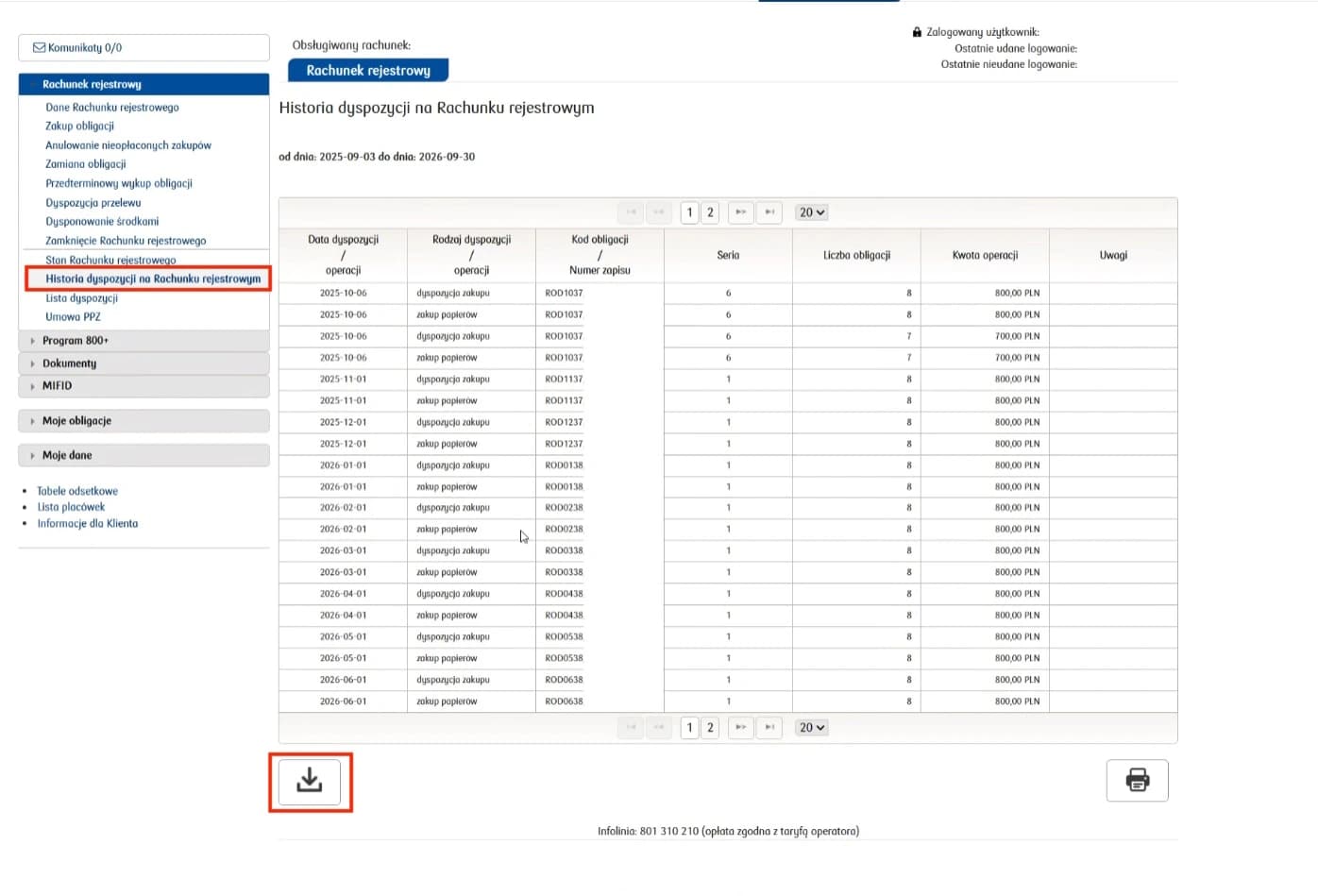
Download the history as XLS
In the PKO BP treasury bond service, open Rachunek rejestrowy → Historia dyspozycji na Rachunku rejestrowym. Then use the download button below the table, highlighted in the screenshot, to save the XLS file.
Step 2
Import the file into FundStat
Select your PKO BP (Treasury Bonds) account and upload the XLS file. Check the column mappings, review the transactions, and confirm the import.
Step 3
Add deposits manually
This export does not include deposits into your treasury bond account. Add these deposits manually in FundStat using their original dates and amounts to keep your account history and cash balance correct.
Need Help?
Our Discord server is FundStat’s main support channel, including help with individual cases. It’s usually the fastest way to get a reply.
Join FundStat on Discord
You can also email us at contact@fundstat.pl.